Education
Building my own Duolingo — A Low-Code Language Learning System Designed Around My Exact Needs
Building my own Duolingo — A Low-Code Language Learning System Designed Around My Exact Needs
My role
Product Owner: Dam Khanh Hoang
Product Builder: Dam Khanh Hoang
Overview
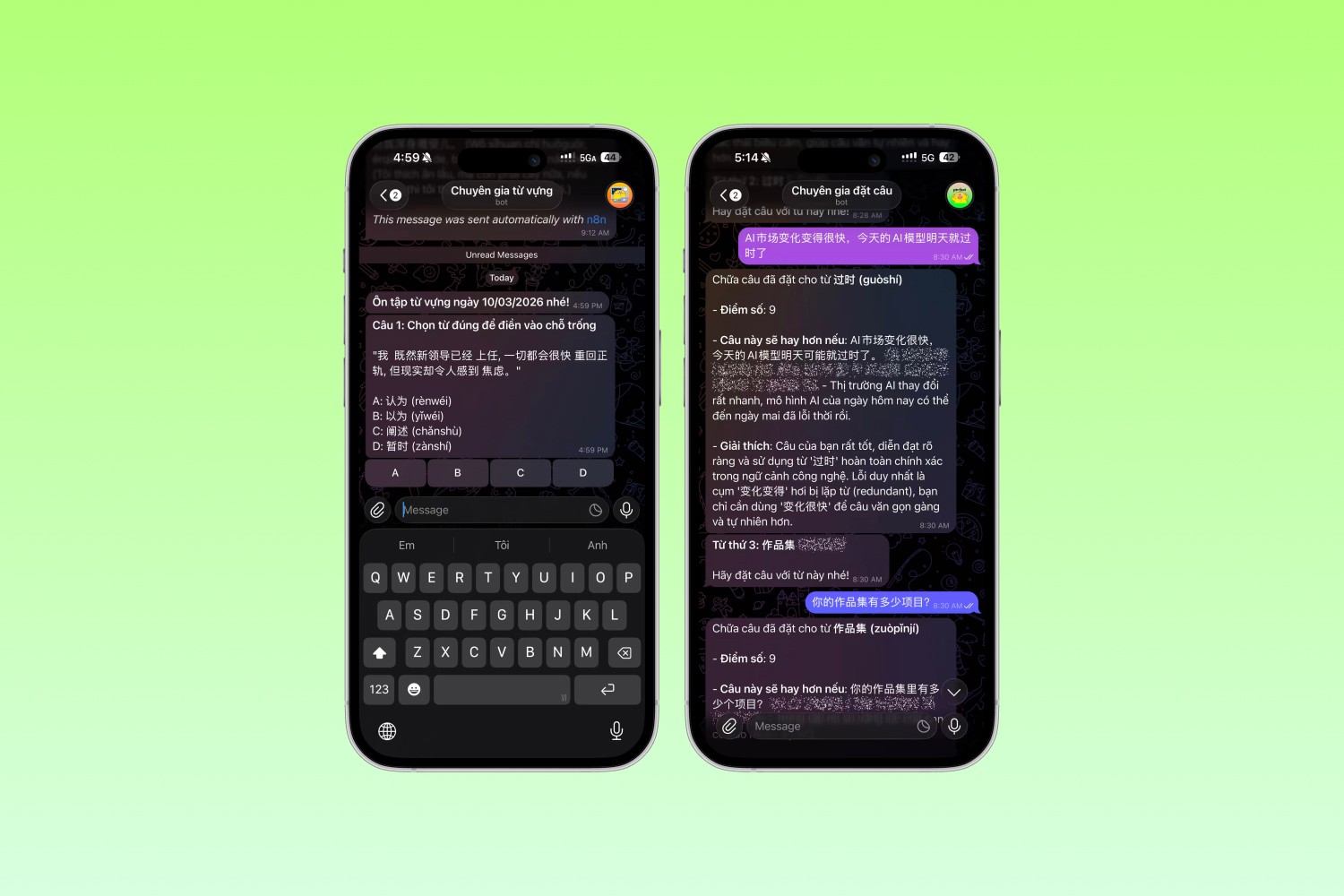
TL;DR: After hitting the ceiling of Duolingo's Chinese learning path, I designed and built my own personalized language learning system using low-code automation tools — inheriting Duolingo's best learning principles while solving the exact limitations I experienced as a real user.
Background
From User to Builder
Three years ago, I started learning Mandarin Chinese from scratch. Like millions of language learners, my first stop was Duolingo.
I genuinely loved it — and for good reason. Two things stood out:
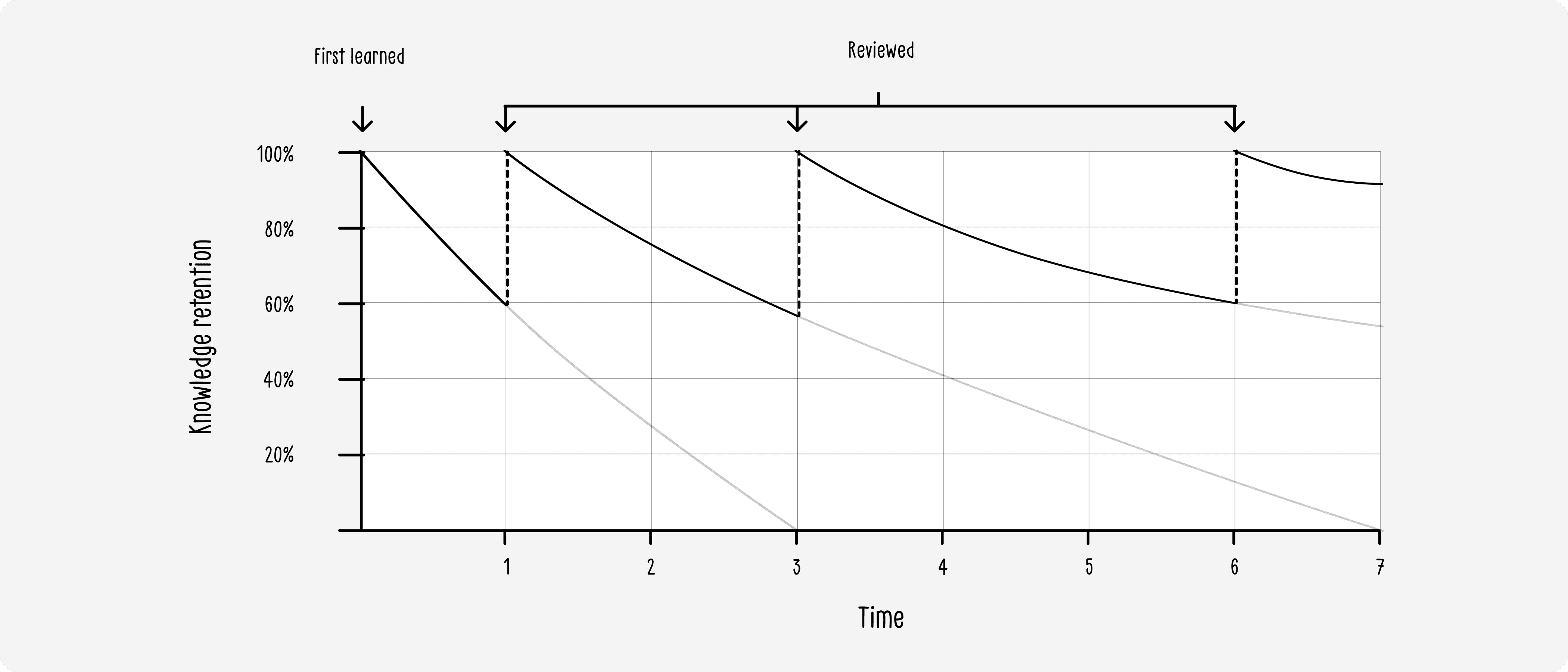
Spaced Repetition: Duolingo's core learning engine schedules reviews at increasing intervals (e.g., after 1 day → 3 days → 1 week → 1 month). This exploits how the brain works: by re-exposing you to information right before you're about to forget it, knowledge gets consolidated from short-term to long-term memory far more efficiently than cramming.
Adaptive Difficulty: Lesson difficulty adjusted to my pace and performance, which kept me in the "flow zone" — challenging enough to progress, but not overwhelming enough to quit.
The result? Within about 1 year of 10–20 minutes of daily learning, I had completed Duolingo's entire Mandarin Chinese curriculum.
Problem Statement
When a Great Product Runs Out of Road
Reaching the top of Duolingo felt like a win. But it quickly revealed a hard ceiling that no amount of engagement could fix:
Pain Point | Root Cause |
|---|---|
No new vocabulary or grammar to learn | Fixed, predefined curriculum; no user-generated content |
Couldn't practice writing, listening (in-depth), or reading | Learning methods locked to limited learning formats |
Subscription cost becoming a barrier | Gated features behind a paid tier, with diminishing returns at advanced level |
The core issue wasn't that Duolingo was bad — it was that Duolingo was built for the masses, not for me. Its curriculum was designed for beginners reaching conversational proficiency, not for someone who'd already cleared its content and wanted to go further.
As an advanced learner, I had three unmet needs:
Custom vocabulary: Learn the words I encounter in real life, not a fixed word list
Multi-modal practice: Writing characters, listening to native content, constructing sentences — not just tapping multiple choice
Cost efficiency: A system I control, without recurring subscription fees for a product I'd outgrown
I accepted that I couldn't change Duolingo. So I decided to build my own.
Product Thinking
Defining the Right Scope
Before touching any tools, I ran a quick self-discovery exercise as both the product owner and the sole user:
Jobs-To-Be-Done
"When I encounter a new word in a Chinese article or show, I want to save it quickly and have it automatically reviewed later."
"When I want to practice writing Hanzi, I want a frictionless way to generate practice sheets without manually picking characters."
"When I consume content on YouTube, I want to turn passive watching into active listening practice."
Design Principles I Set
Inherit what works — Keep spaced repetition and adaptive review from Duolingo's proven model
Break the content ceiling — Users define their own learning material, no more fixed curricula
Multi-modal by default — Practice must extend beyond multiple choice
Low friction above all — The system must fit into daily habits, not create new ones
Scope Decision:
Rather than rebuilding a full app from the ground up, I made a deliberate call to use existing interfaces and automation tools. This let me ship a working MVP in weeks — not months — and focus my energy on the learning logic rather than UI infrastructure.
Tech Stack Decisions
Choosing the Right Tools for the Right Reasons
Every technology choice was a conscious product decision, not a default:
Layer | Tool | Rationale |
|---|---|---|
User Interface | Telegram | Personal-scale app; Telegram's bot API provides a familiar, zero-install chat interface. No need to build a UI from scratch. |
Automation & Logic | n8n | Flexible enough to connect all third-party services (Notion, AI APIs, YouTube), and low-code enough to allow rapid iteration without engineering resources. |
Data Storage | Notion | Highly customizable data structure, easy to inspect and modify manually, and perfectly stable for personal-scale data volumes. |
AI Layer | LLM API | Powers vocabulary explanation, sentence grading, listening question generation, and personalized feedback. |
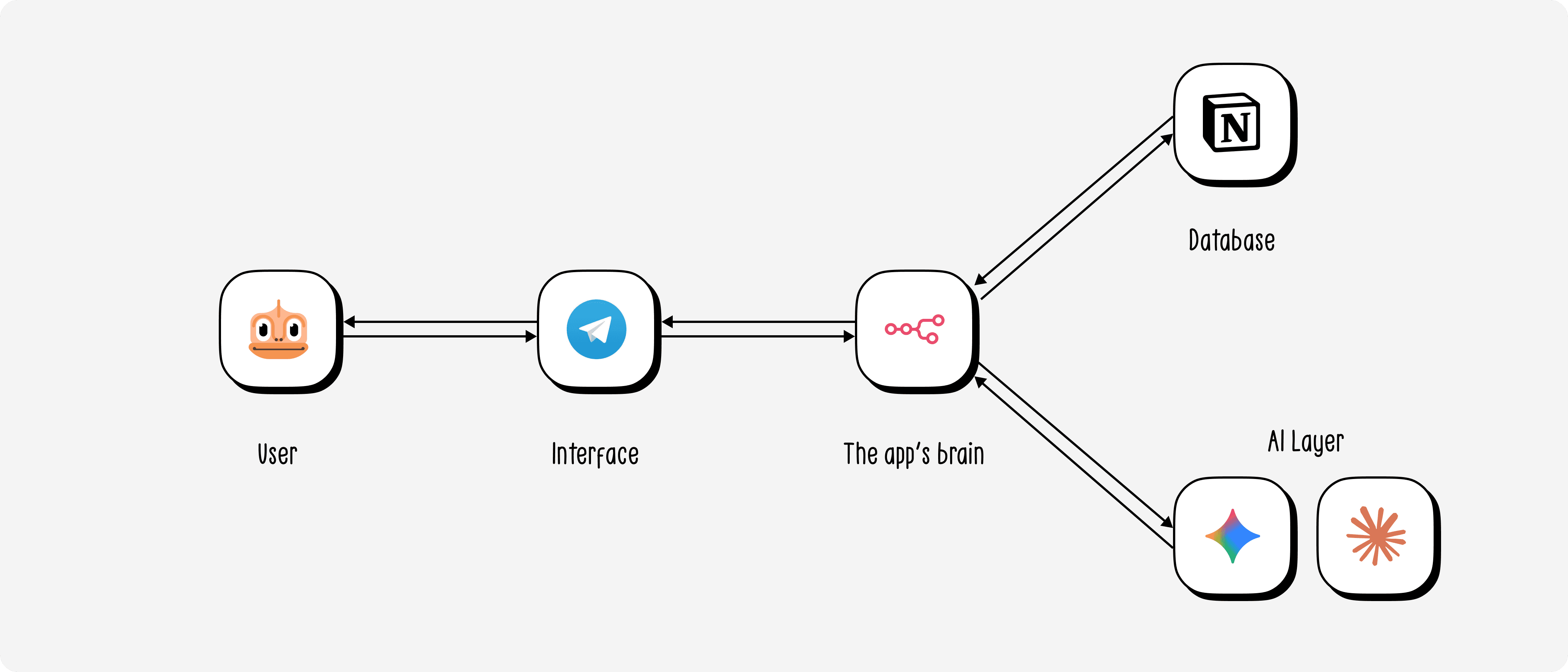
This stack reflects a key product mindset that I apply: use boring, reliable technology for infrastructure, so you can spend creativity on the actual product experience.
Feature Design
Feature 1 — Add Vocabulary
The Duolingo way: You learn a pre-packaged word list. You have no say in what you study.
My approach: You add any word you want, at any time, via Telegram. The system then uses AI to generate a rich, personalized explanation — including definition, example sentences, tone/context notes, and mnemonics — formatted in whatever style the user prefers.
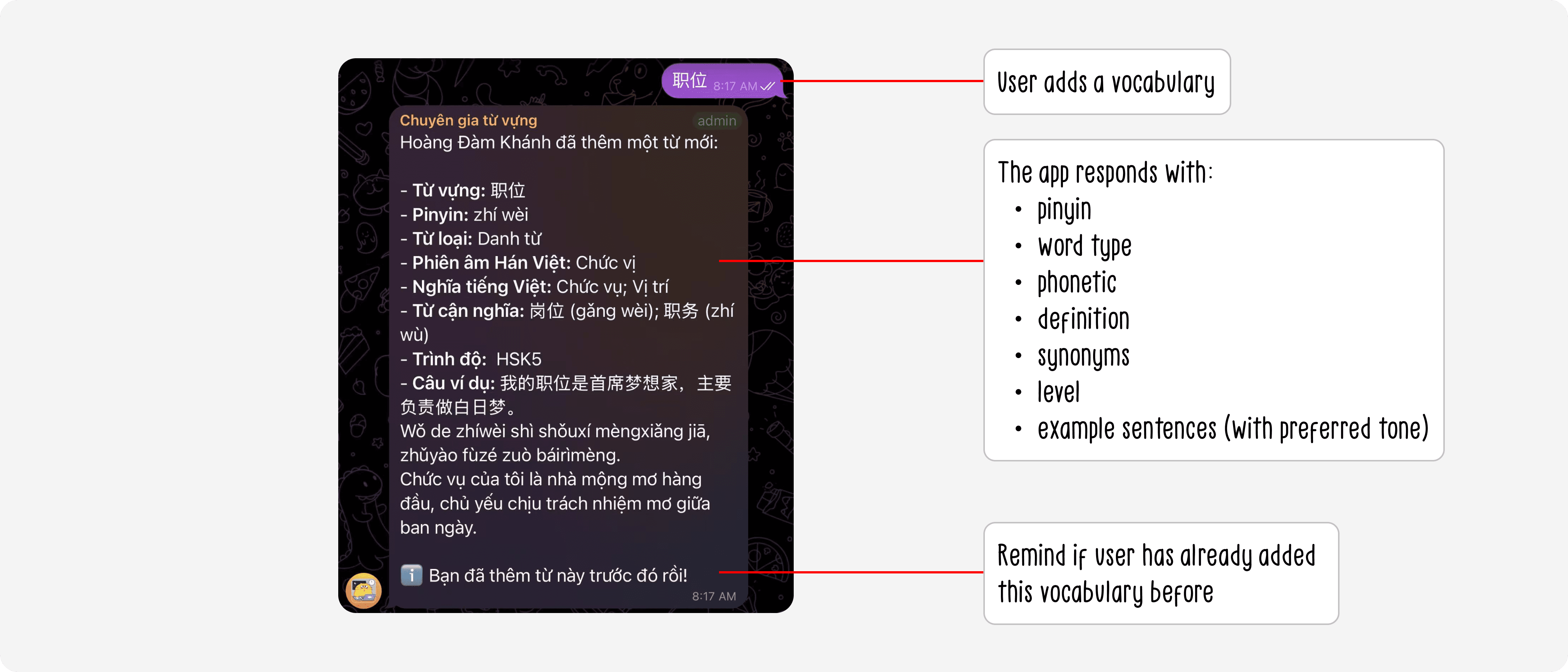
In my case, I configured the AI to explain vocabulary in a casual, playful tone — similar to Duolingo's mascot personality — because I learn better when I'm entertained.
Why this matters from a PM lens:
Removes the curriculum ceiling entirely — any word at any proficiency level is valid
Personalized explanation style increases retention and engagement
Ultra-low friction: one message to Telegram is all it takes
Feature 2 — Spaced Repetition Review (Enhanced)
The Duolingo way: Mark a word as "learned" by answering a multiple-choice question correctly. That's the only signal the system uses.
My approach: The daily review engine pulls vocabulary from the Notion database based on spaced repetition intervals. But instead of only multiple choice, it supports three review modes:
Sentence Construction
Each day, the system prompts: "Use [word] in a sentence." The user replies in Chinese. The AI then:
Grades the sentence for grammar accuracy and naturalness
Rewrites it to sound more native
Explains what was corrected and why
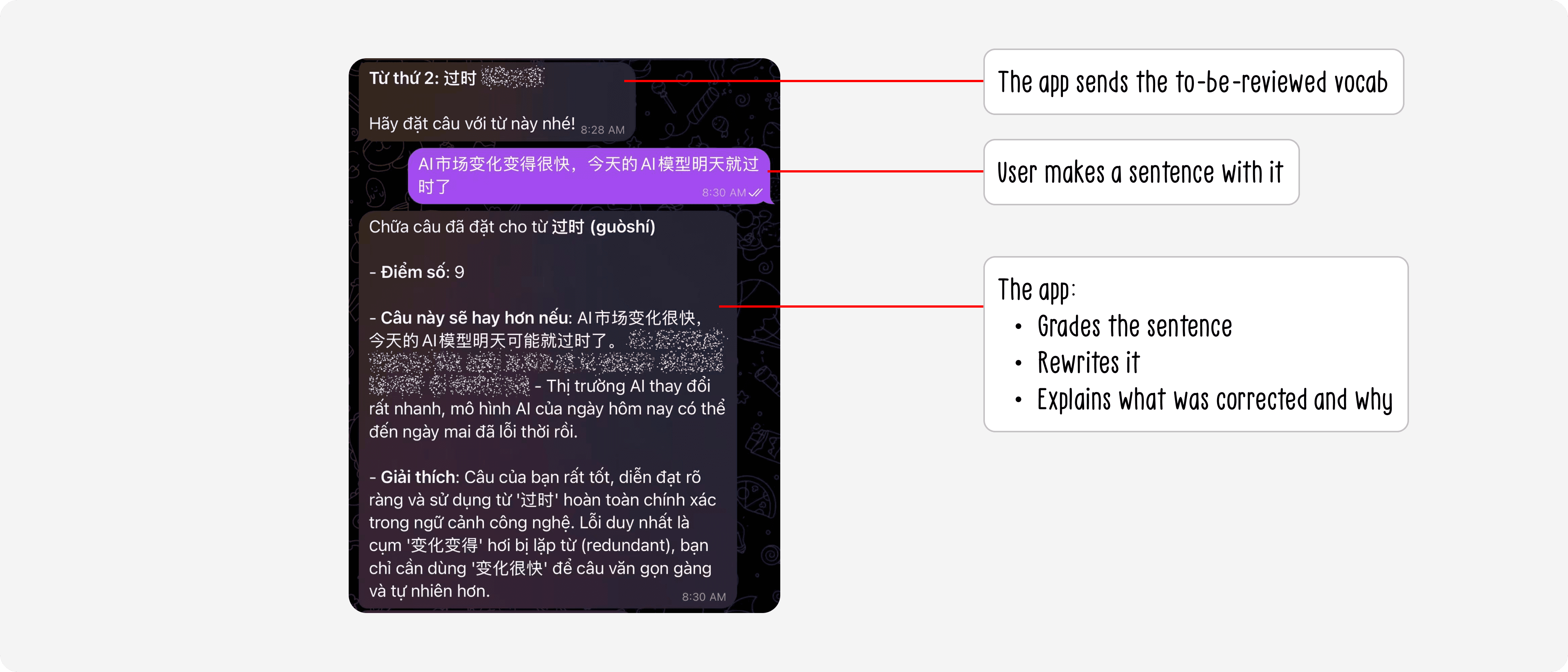
This forces active recall and production, two of the most effective learning mechanisms in language acquisition research.
Hanzi Writing Practice
The system auto-generates a formatted vocabulary worksheet based on a pre-built template. The user opens it on their iPad in a drawing app and traces/writes the characters by hand.
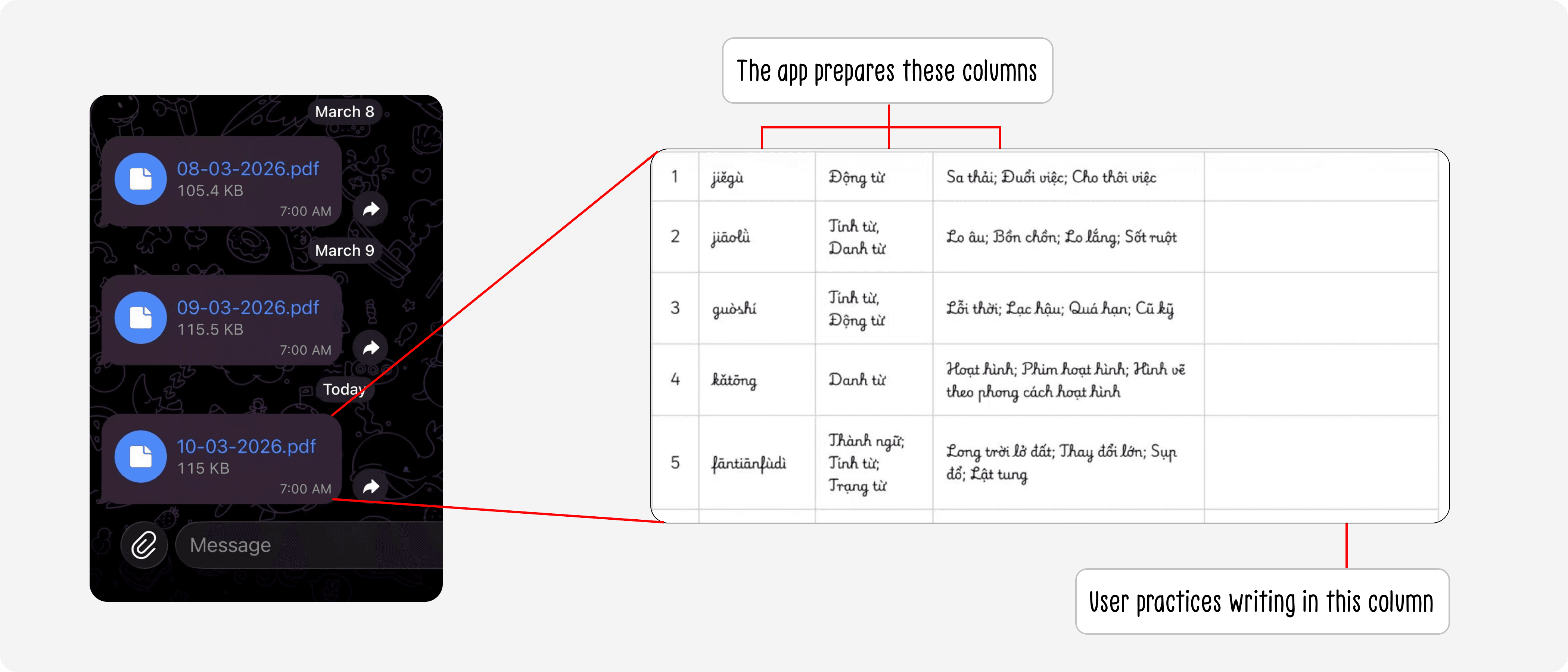
Handwriting Hanzi is proven to dramatically strengthen character memorization through motor memory.
Traditional Multiple Choice (inherited from Duolingo)
Still available as a quick daily check-in, requiring minimal cognitive load.
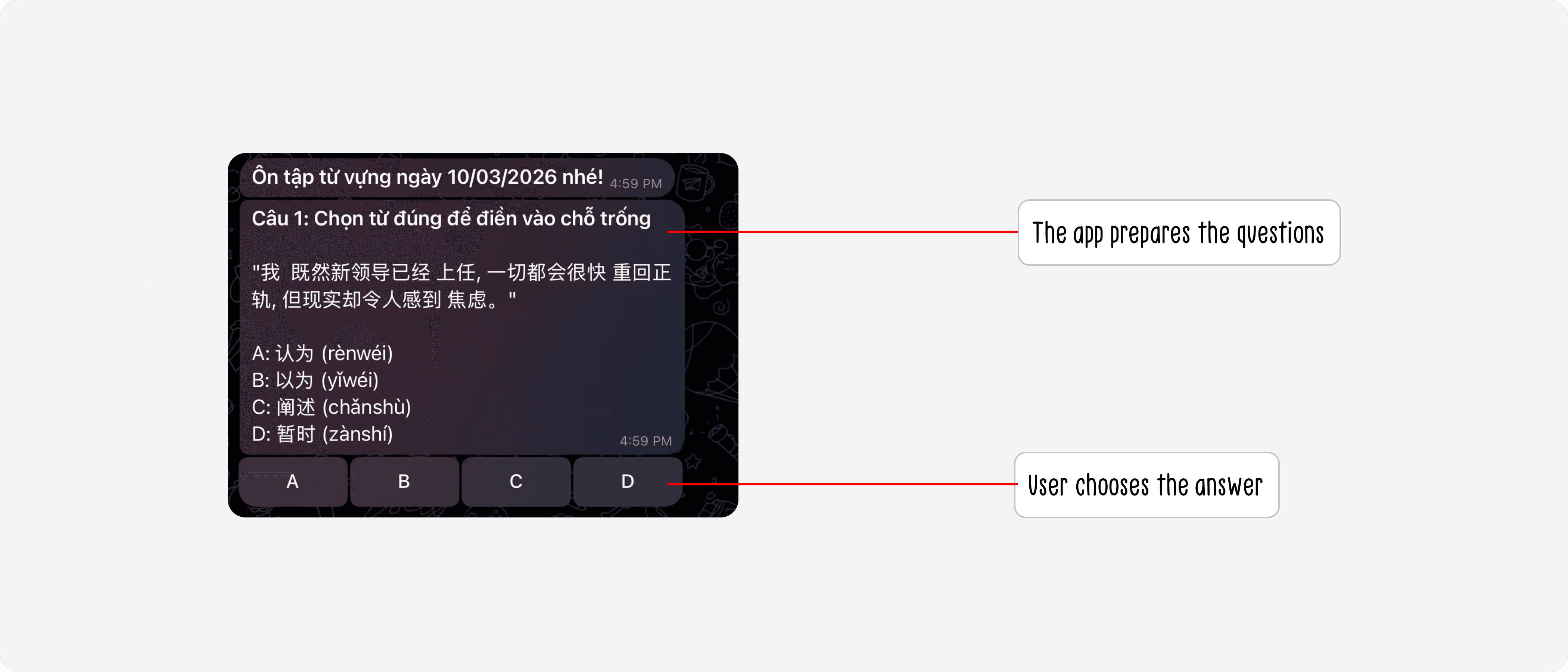
Why this matters from a PM lens:
This feature expansion came directly from watching myself use Duolingo for a year. I identified the gap: the system only validated recognition, not production. Adding sentence construction and writing shifts the product from passive to active learning — a meaningful capability upgrade with high retention impact.
Feature 3 — AI-Powered Listening Practice
The gap I identified: There's almost no product that turns your own content into structured listening exercises. You either listen passively (YouTube) or do generic listening drills (textbooks). Neither worked for me.
My approach: I built a pipeline where I add YouTube videos I'm already interested in to a playlist. Each day, the system:
Fetches the transcript of a queued video
Converts the relevant segment into a Chinese audio file (TTS)
Auto-generates multiple-choice comprehension questions — modeled after the format of standardized Chinese language certification exams (HSK)
Delivers the audio + questions to me via Telegram
After I answer, provides a full explanation of correct and incorrect options
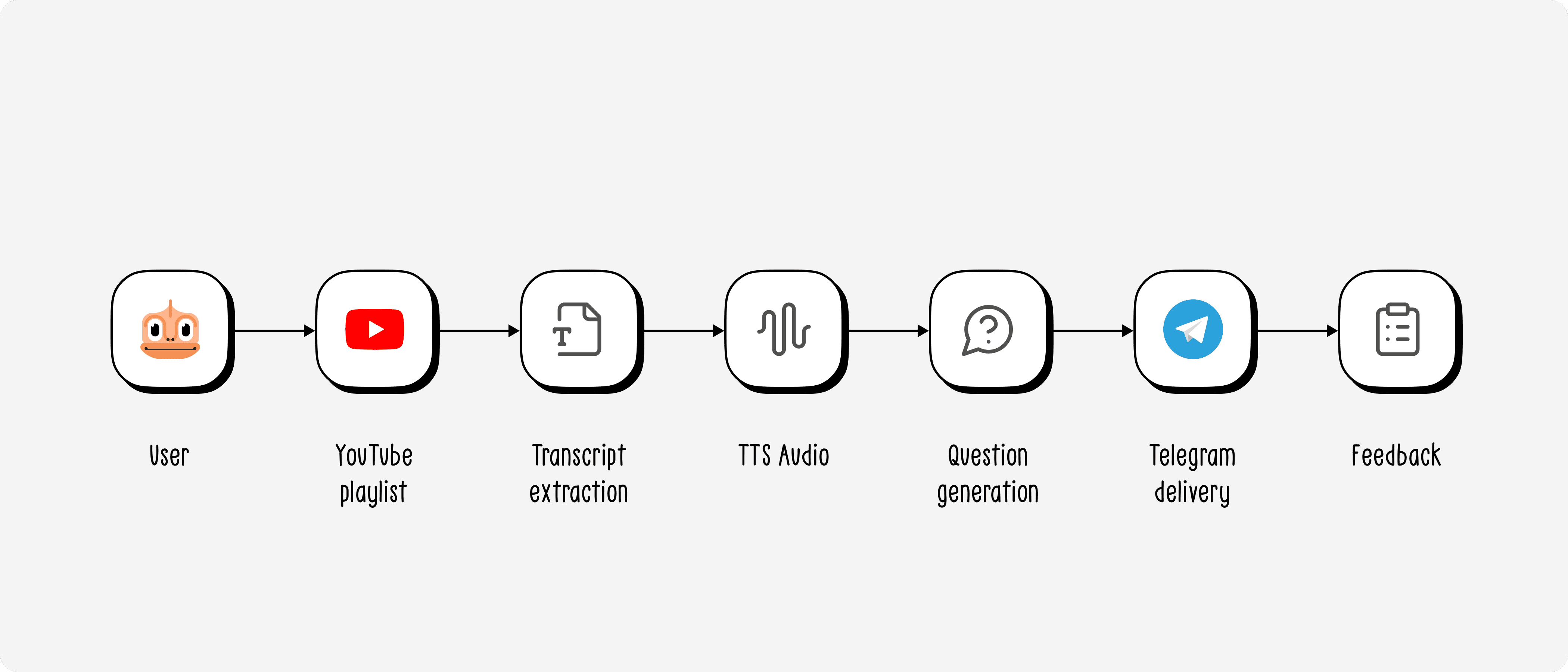
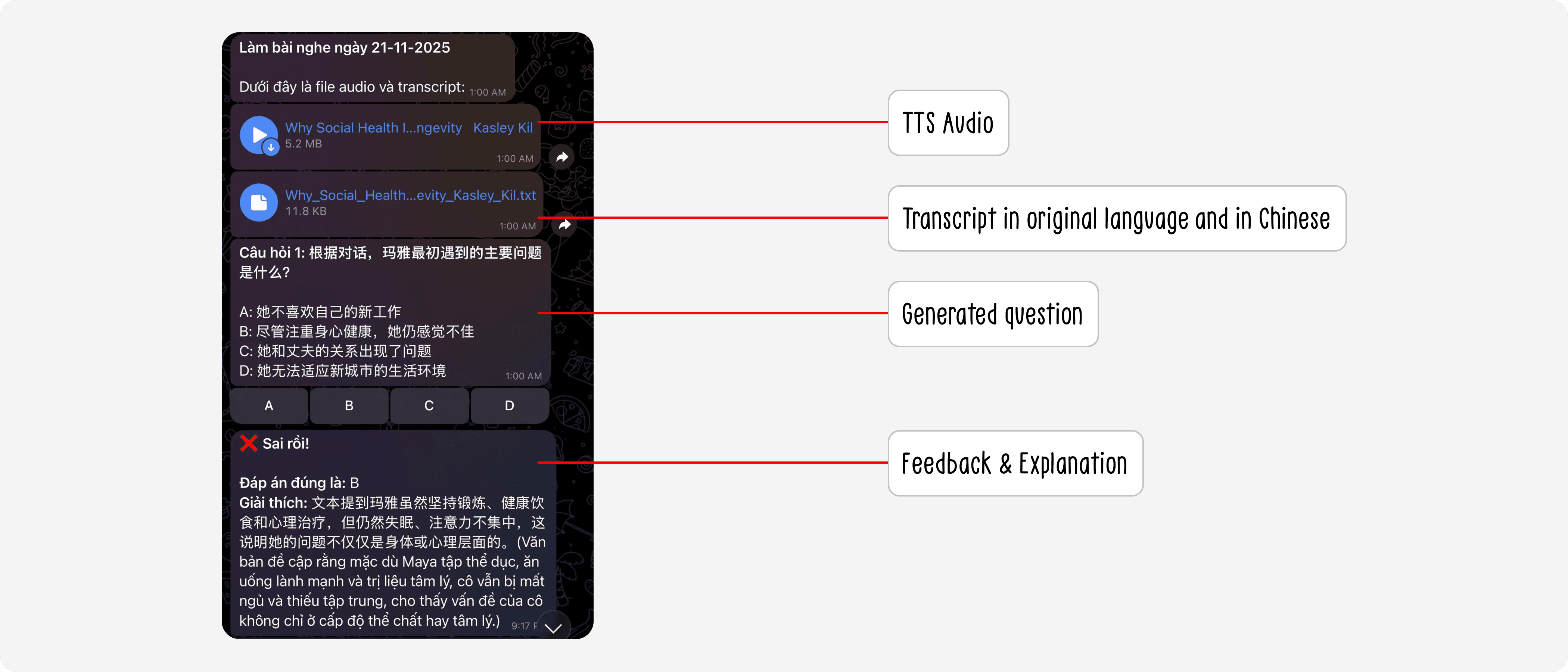
The result: Passive content I would have watched anyway becomes a structured daily listening drill — zero additional content curation needed from me.
Why this matters from a PM lens:
This feature demonstrates a core product instinct: reduce the marginal effort required to engage with a feature. By plugging into content I'm already consuming (YouTube), I eliminated the "what should I study today?" decision fatigue entirely.
Reflections
What This Project Taught Me About Product Work
Building this system as both the PM and the user gave me an unusually honest feedback loop. A few learnings that shaped how I think about product:
1. Being the user is a superpower — and a blind spot.
I could test in real conditions, feel friction immediately, and iterate fast. But I also had to consciously check myself: "Is this a me problem, or a broader user problem?" That question is the dividing line between a personal project and a scalable product.
2. Constraints accelerate good decisions.
No engineering team, no budget, no timeline. These constraints forced me to cut scope ruthlessly and prioritize impact per unit of effort. Every feature had to justify itself against: "Is this worth the automation complexity?"
3. Low-code isn't a limitation — it's a product prototyping advantage.
By the time most teams would have finished requirements documentation, I had a working system I was actually learning Chinese with. The speed of low-code prototyping makes validation cycles dramatically faster.
4. Automation is a PM leverage multiplier.
Understanding how to wire together APIs, data pipelines, and AI without writing code changes what a PM can independently validate. I didn't need to wait for an engineer to test whether AI-generated sentence feedback was actually useful — I just built it and found out.
What's Next
This is a living system. Features I'm actively experimenting with:
Reading comprehension pipeline — Auto-extract articles from RSS feeds, highlight unknown words, and push to vocabulary review
Tone & pronunciation feedback — Use speech recognition APIs to evaluate Mandarin tones and give corrective feedback
Multi-user expansion — Onboarding a larger group of friends and colleagues to validate whether the system's personalization model generalizes beyond my own usage patterns
Commercialization hypothesis — If the multi-user pilot shows strong retention, explore whether this could become a lightweight SaaS product for advanced language learners who've "graduated" from Duolingo
Closing Thought
I started this project as a user who had hit a wall with the tools available to them. What I built wasn't just a language learning app — it was a proof of concept for a bigger idea:
When you combine product thinking with automation fluency, you can go from identifying a user problem to having a working solution in your hands — without waiting for anyone else.
That's the kind of speed and ownership I want to bring to every product I work on.
Note
This case study is part of a series exploring the intersection of product thinking and low-code automation. The application described here also serves as hands-on workshop material for the Automation Foundation course that I teach at UX Foundation.
Background
From User to Builder
Three years ago, I started learning Mandarin Chinese from scratch. Like millions of language learners, my first stop was Duolingo.
I genuinely loved it — and for good reason. Two things stood out:
Spaced Repetition: Duolingo's core learning engine schedules reviews at increasing intervals (e.g., after 1 day → 3 days → 1 week → 1 month). This exploits how the brain works: by re-exposing you to information right before you're about to forget it, knowledge gets consolidated from short-term to long-term memory far more efficiently than cramming.
Adaptive Difficulty: Lesson difficulty adjusted to my pace and performance, which kept me in the "flow zone" — challenging enough to progress, but not overwhelming enough to quit.
The result? Within about 1 year of 10–20 minutes of daily learning, I had completed Duolingo's entire Mandarin Chinese curriculum.
Problem Statement
When a Great Product Runs Out of Road
Reaching the top of Duolingo felt like a win. But it quickly revealed a hard ceiling that no amount of engagement could fix:
Pain Point | Root Cause |
|---|---|
No new vocabulary or grammar to learn | Fixed, predefined curriculum; no user-generated content |
Couldn't practice writing, listening (in-depth), or reading | Learning methods locked to limited learning formats |
Subscription cost becoming a barrier | Gated features behind a paid tier, with diminishing returns at advanced level |
The core issue wasn't that Duolingo was bad — it was that Duolingo was built for the masses, not for me. Its curriculum was designed for beginners reaching conversational proficiency, not for someone who'd already cleared its content and wanted to go further.
As an advanced learner, I had three unmet needs:
Custom vocabulary: Learn the words I encounter in real life, not a fixed word list
Multi-modal practice: Writing characters, listening to native content, constructing sentences — not just tapping multiple choice
Cost efficiency: A system I control, without recurring subscription fees for a product I'd outgrown
I accepted that I couldn't change Duolingo. So I decided to build my own.
Product Thinking
Defining the Right Scope
Before touching any tools, I ran a quick self-discovery exercise as both the product owner and the sole user:
Jobs-To-Be-Done
"When I encounter a new word in a Chinese article or show, I want to save it quickly and have it automatically reviewed later."
"When I want to practice writing Hanzi, I want a frictionless way to generate practice sheets without manually picking characters."
"When I consume content on YouTube, I want to turn passive watching into active listening practice."
Design Principles I Set
Inherit what works — Keep spaced repetition and adaptive review from Duolingo's proven model
Break the content ceiling — Users define their own learning material, no more fixed curricula
Multi-modal by default — Practice must extend beyond multiple choice
Low friction above all — The system must fit into daily habits, not create new ones
Scope Decision:
Rather than rebuilding a full app from the ground up, I made a deliberate call to use existing interfaces and automation tools. This let me ship a working MVP in weeks — not months — and focus my energy on the learning logic rather than UI infrastructure.
Tech Stack Decisions
Choosing the Right Tools for the Right Reasons
Every technology choice was a conscious product decision, not a default:
Layer | Tool | Rationale |
|---|---|---|
User Interface | Telegram | Personal-scale app; Telegram's bot API provides a familiar, zero-install chat interface. No need to build a UI from scratch. |
Automation & Logic | n8n | Flexible enough to connect all third-party services (Notion, AI APIs, YouTube), and low-code enough to allow rapid iteration without engineering resources. |
Data Storage | Notion | Highly customizable data structure, easy to inspect and modify manually, and perfectly stable for personal-scale data volumes. |
AI Layer | LLM API | Powers vocabulary explanation, sentence grading, listening question generation, and personalized feedback. |
This stack reflects a key product mindset that I apply: use boring, reliable technology for infrastructure, so you can spend creativity on the actual product experience.
Feature Design
Feature 1 — Add Vocabulary
The Duolingo way: You learn a pre-packaged word list. You have no say in what you study.
My approach: You add any word you want, at any time, via Telegram. The system then uses AI to generate a rich, personalized explanation — including definition, example sentences, tone/context notes, and mnemonics — formatted in whatever style the user prefers.
In my case, I configured the AI to explain vocabulary in a casual, playful tone — similar to Duolingo's mascot personality — because I learn better when I'm entertained.
Why this matters from a PM lens:
Removes the curriculum ceiling entirely — any word at any proficiency level is valid
Personalized explanation style increases retention and engagement
Ultra-low friction: one message to Telegram is all it takes
Feature 2 — Spaced Repetition Review (Enhanced)
The Duolingo way: Mark a word as "learned" by answering a multiple-choice question correctly. That's the only signal the system uses.
My approach: The daily review engine pulls vocabulary from the Notion database based on spaced repetition intervals. But instead of only multiple choice, it supports three review modes:
Sentence Construction
Each day, the system prompts: "Use [word] in a sentence." The user replies in Chinese. The AI then:
Grades the sentence for grammar accuracy and naturalness
Rewrites it to sound more native
Explains what was corrected and why
This forces active recall and production, two of the most effective learning mechanisms in language acquisition research.
Hanzi Writing Practice
The system auto-generates a formatted vocabulary worksheet based on a pre-built template. The user opens it on their iPad in a drawing app and traces/writes the characters by hand.
Handwriting Hanzi is proven to dramatically strengthen character memorization through motor memory.
Traditional Multiple Choice (inherited from Duolingo)
Still available as a quick daily check-in, requiring minimal cognitive load.
Why this matters from a PM lens:
This feature expansion came directly from watching myself use Duolingo for a year. I identified the gap: the system only validated recognition, not production. Adding sentence construction and writing shifts the product from passive to active learning — a meaningful capability upgrade with high retention impact.
Feature 3 — AI-Powered Listening Practice
The gap I identified: There's almost no product that turns your own content into structured listening exercises. You either listen passively (YouTube) or do generic listening drills (textbooks). Neither worked for me.
My approach: I built a pipeline where I add YouTube videos I'm already interested in to a playlist. Each day, the system:
Fetches the transcript of a queued video
Converts the relevant segment into a Chinese audio file (TTS)
Auto-generates multiple-choice comprehension questions — modeled after the format of standardized Chinese language certification exams (HSK)
Delivers the audio + questions to me via Telegram
After I answer, provides a full explanation of correct and incorrect options
The result: Passive content I would have watched anyway becomes a structured daily listening drill — zero additional content curation needed from me.
Why this matters from a PM lens:
This feature demonstrates a core product instinct: reduce the marginal effort required to engage with a feature. By plugging into content I'm already consuming (YouTube), I eliminated the "what should I study today?" decision fatigue entirely.
Reflections
What This Project Taught Me About Product Work
Building this system as both the PM and the user gave me an unusually honest feedback loop. A few learnings that shaped how I think about product:
1. Being the user is a superpower — and a blind spot.
I could test in real conditions, feel friction immediately, and iterate fast. But I also had to consciously check myself: "Is this a me problem, or a broader user problem?" That question is the dividing line between a personal project and a scalable product.
2. Constraints accelerate good decisions.
No engineering team, no budget, no timeline. These constraints forced me to cut scope ruthlessly and prioritize impact per unit of effort. Every feature had to justify itself against: "Is this worth the automation complexity?"
3. Low-code isn't a limitation — it's a product prototyping advantage.
By the time most teams would have finished requirements documentation, I had a working system I was actually learning Chinese with. The speed of low-code prototyping makes validation cycles dramatically faster.
4. Automation is a PM leverage multiplier.
Understanding how to wire together APIs, data pipelines, and AI without writing code changes what a PM can independently validate. I didn't need to wait for an engineer to test whether AI-generated sentence feedback was actually useful — I just built it and found out.
What's Next
This is a living system. Features I'm actively experimenting with:
Reading comprehension pipeline — Auto-extract articles from RSS feeds, highlight unknown words, and push to vocabulary review
Tone & pronunciation feedback — Use speech recognition APIs to evaluate Mandarin tones and give corrective feedback
Multi-user expansion — Onboarding a larger group of friends and colleagues to validate whether the system's personalization model generalizes beyond my own usage patterns
Commercialization hypothesis — If the multi-user pilot shows strong retention, explore whether this could become a lightweight SaaS product for advanced language learners who've "graduated" from Duolingo
Closing Thought
I started this project as a user who had hit a wall with the tools available to them. What I built wasn't just a language learning app — it was a proof of concept for a bigger idea:
When you combine product thinking with automation fluency, you can go from identifying a user problem to having a working solution in your hands — without waiting for anyone else.
That's the kind of speed and ownership I want to bring to every product I work on.
Note
This case study is part of a series exploring the intersection of product thinking and low-code automation. The application described here also serves as hands-on workshop material for the Automation Foundation course that I teach at UX Foundation.