Operation
Redesigning, Migrating, and Operating UX Foundation's Database
Redesigning, Migrating, and Operating UX Foundation's Database
My role
Sole contributor - spanning product strategy, database design, data engineering, and infrastructure setup: Dam Khanh Hoang
Operations Manager - Led Phase 3 workflow migration (Notion → NocoDB mirroring), currently executing Phase 4 cutover: Thanh Van Nguyen
Overview
TL;DR: UX Foundation was running all of its internal data on Lark Suite — unstructured, unqueryable, and impossible to automate. I redesigned the entire database from scratch using a relational model, migrated to Notion to ship fast, then migrated again to PostgreSQL + NocoDB on the organization's own VPS when Notion hit its ceiling. The result: query time dropped from 20+ seconds to under 1 second, 20+ automation workflows now running in production, and student data is protected on infrastructure the organization fully controls.
Stack: Lark Suite → Notion → PostgreSQL + NocoDB
Context
About a year ago, UX Foundation was running all of its internal data on Lark Suite. On the surface, things seemed fine — classes were running, student records were being saved. But as the workload of the teaching assistants and admin team grew, we started realizing that a huge amount of works was being done manually — works that could easily be automated. That's when we started building our first automation workflows — and that's when the real problems began to surface.
Problem statement
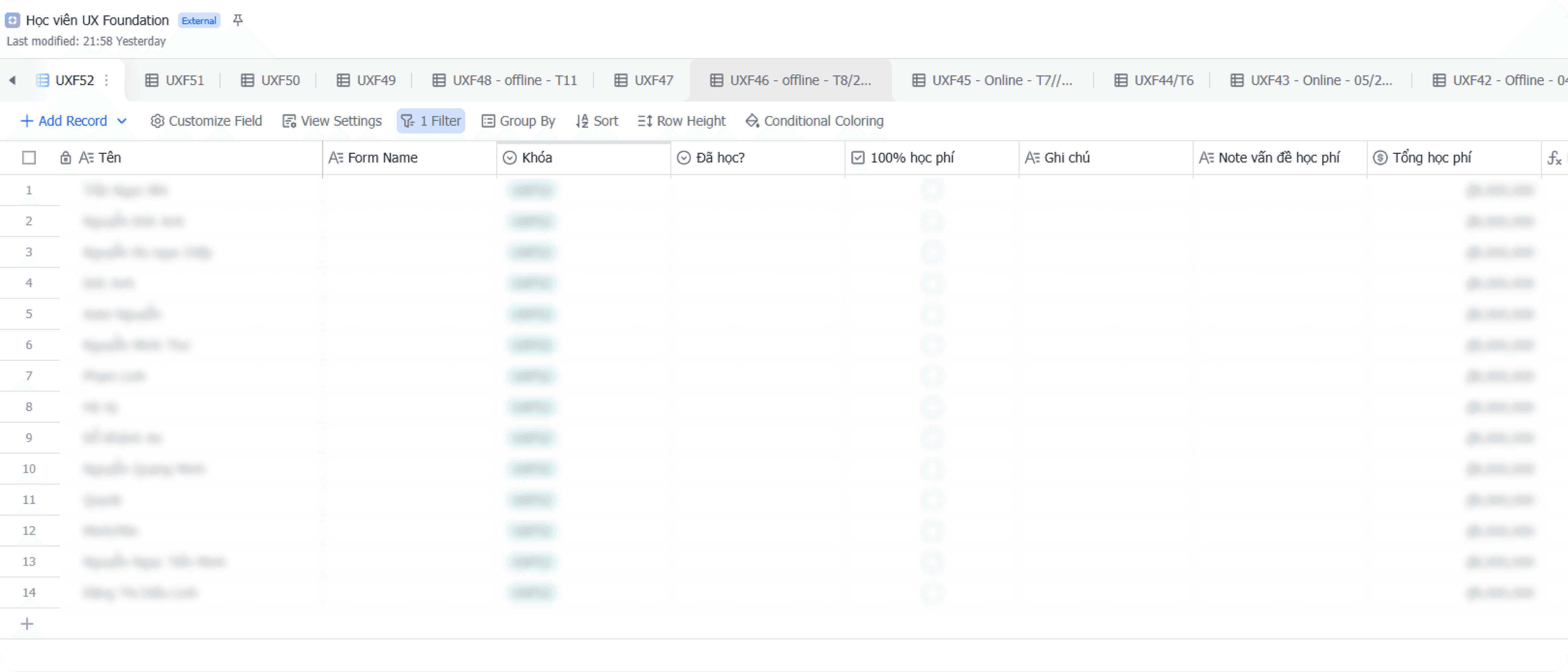
Just a few workflows in, we kept hitting a wall around "feasibility." Looking back, there were three root causes:
Data was designed to store, not to query
All information — student profiles, payment status, learning progress, course and class details — was stuffed into a single flat table per course. Every new registration added a new row. The result was a dataset full of duplicates — especially for students who had taken more than one course — with no way to cross-reference between courses.
A lot of important things had nowhere to live
Class schedules, staff assignments, operational class status — none of these belonged to any specific student, so we had no idea where to store them. This became the biggest bottleneck every time we tried to plan a new automation workflow.
Lark Suite didn't play well with our automation ecosystem
Lark Suite's API at the time was complex and error-prone. More importantly, the platform had poor support on n8n — our automation tool of choice — making it far harder than necessary to build and maintain automated workflows.
Product thinking
Jobs-To-Be-Done
Before redesigning anything, I sat down and listed out the actual jobs the team needed to get done — not "features", but the real operational needs behind each pain point.
"When I need to check which courses a student is enrolled in, I want to find it in seconds — instead of opening separate bases one by one."
"When a student registers for a new course, I want the system to automatically link them to their existing profile — instead of creating a brand new record and duplicating their data."
"When I need to assign a teaching assistant to a class, I want one single place to store that and have automation workflows read from it — instead of saving it somewhere nobody can find."
"When building a new automation workflow, I want the input data to always be consistent and well-structured — instead of having to 'clean up' data before every run."
These four needs pointed to one shared conclusion: the problem wasn't the tool — it was how the data was organized. No good database design, no good automation.
Database design
My belief was that there are countless ways to design a textbook-correct database, but that doesn't mean it'll actually fit the organization. To design something that works, I needed to understand how data had been, was currently being, and would be used — so I could tailor a solution that truly fit. Therefore, I ran a series of working sessions with the Founder and Ops Manager to uncover real use cases and constructed the ERD as followed:
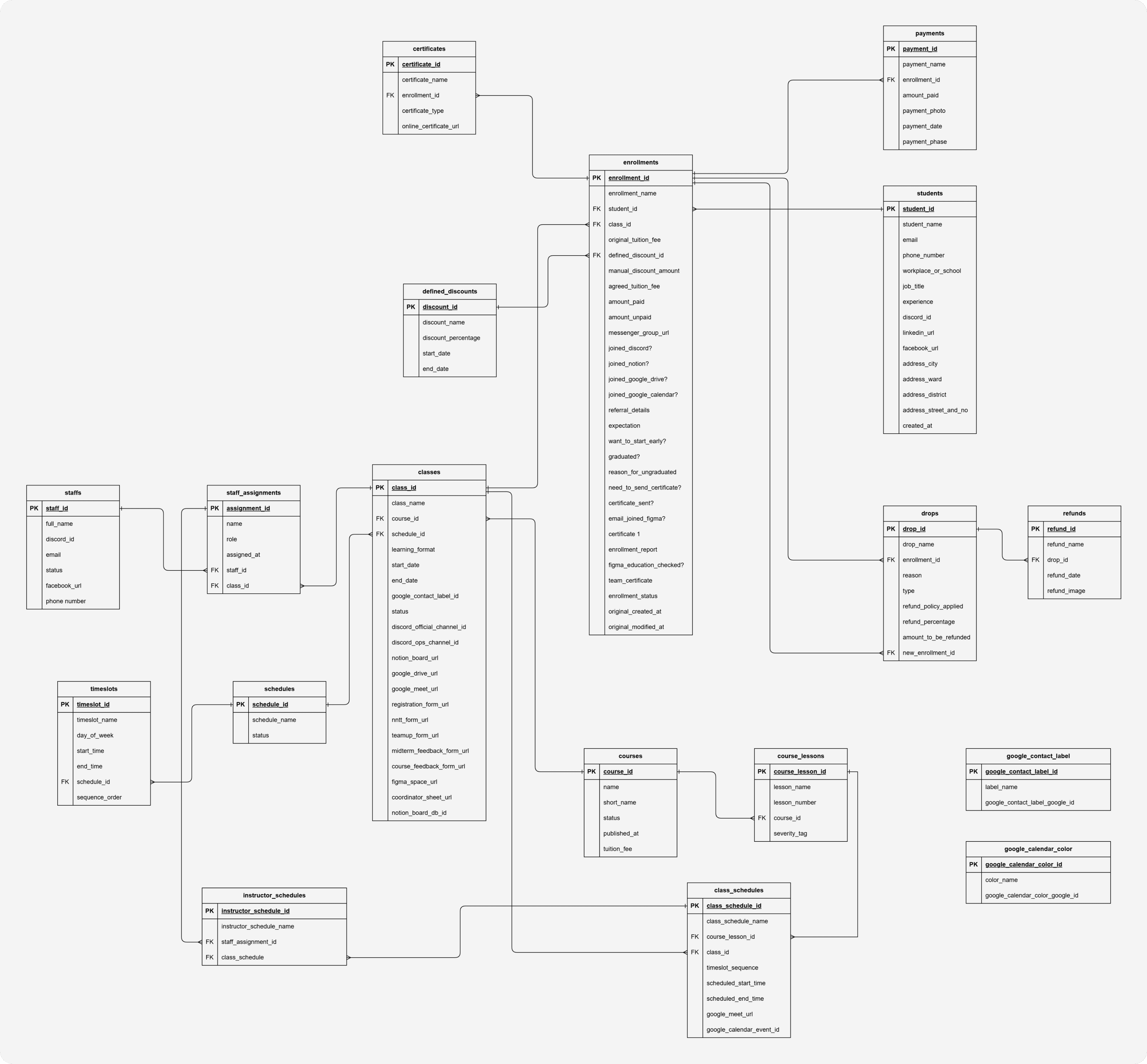
Below are the four most important design decisions in this ERD — and the reasoning behind each.
Decision 1: Separating students and enrollments — one learner, many learning journeys
In the old Lark Suite setup, every time a student registered for a new course, the team created a completely new row — even if that person had already taken a previous course. The result was the same person appearing in 3 or 4 different places, sometimes with conflicting information.
Decision: students stores the person — existing exactly once. enrollments stores the relationship between that student and a specific class — including all payment, onboarding, and learning status. One student takes 3 courses → 1 record in students, 3 records in enrollments.
This directly resolved the biggest pain point: now a single query by student_id returns the full learning history of any person — no need to dig through separate tables.
Decision 2: The payment chain enrollments → payments → drops → refunds
During a working session with the Ops Manager, one seemingly simple question opened up a bigger question: "If a student drops out, how do we calculate the refund?" The answer was: it depends — on the reason, the timing, and sometimes the student doesn't fully drop but transfers to another class.
Instead of cramming everything into a status field inside enrollments, we designed a separate chain:
payments— stores each individual payment (one enrollment can have multiple payment installments)drops— records the dropout event, along with the applicable refund policy and amount owed. Thenew_enrollment_idfield captures cases where a student drops to transfer to a different classrefunds— stores proof of actual refund (date, transfer screenshot)
Without this, it would be impossible to automate workflows like "remind students of unfinished tuition payment" or "confirm refund completed" — because the data simply had no structure to query.
Decision 3: classes as an integration hub — single source of truth for the entire ops stack
A key insight from the team session: every time a new class was opened, the Ops Manager had to visit 7–8 different tools (Discord, Notion, Google Drive, Google Meet, Figma, Teamup, registration forms...) and copy-paste links between them. There was no single place storing all those links together.
Decision: the classes table doesn't just store class metadata — it stores all the URLs and tool IDs associated with it: discord_official_channel_id, notion_board_url, google_drive_url, figma_space_url, registration_form_url... This turns classes into a central hub that any automation can query to get the right tool link for the right class — no hardcoding, no memorizing.
Decision 4: A reusable scheduling system — schedules → timeslots → class_schedules
Each term, UX Foundation opens multiple classes with recurring time slots (e.g., "Tuesday and Friday evenings, 7–10 PM"). Previously, every class had to re-enter its schedule from scratch.
schedules stores reusable schedule templates. timeslots defines the specific time slots within each template. class_schedules is where a template gets "materialized" into actual sessions — mapping which lesson, which class, the Google Meet link, and the Google Calendar event ID for that session. instructor_schedules determines who teaches which session.
The result: opening a new class with the same schedule → just assign the existing template, and automation can generate Google Calendar events without any manual re-entry.
Phase 1 - Lark to Notion
Why Notion?
This wasn't a default choice — I had specific reasons for each priority.
First, Notion was already the team's primary workspace. That meant the learning curve was essentially zero — no onboarding anyone into a new tool, no friction during the transition.
Second, and more important at the time: Notion's database is remarkably forgiving. With traditional database systems, entering an enum value that hasn't been predefined throws an error immediately. Notion doesn't — it just creates a new option on the fly. This flexibility became a strategic advantage: in the early phase of data standardization, when the schema still had plenty of unhandled edge cases, Notion's permissiveness let us reduce complexity and ship automation workflows earlier instead of getting blocked by data validation errors.
The migration process
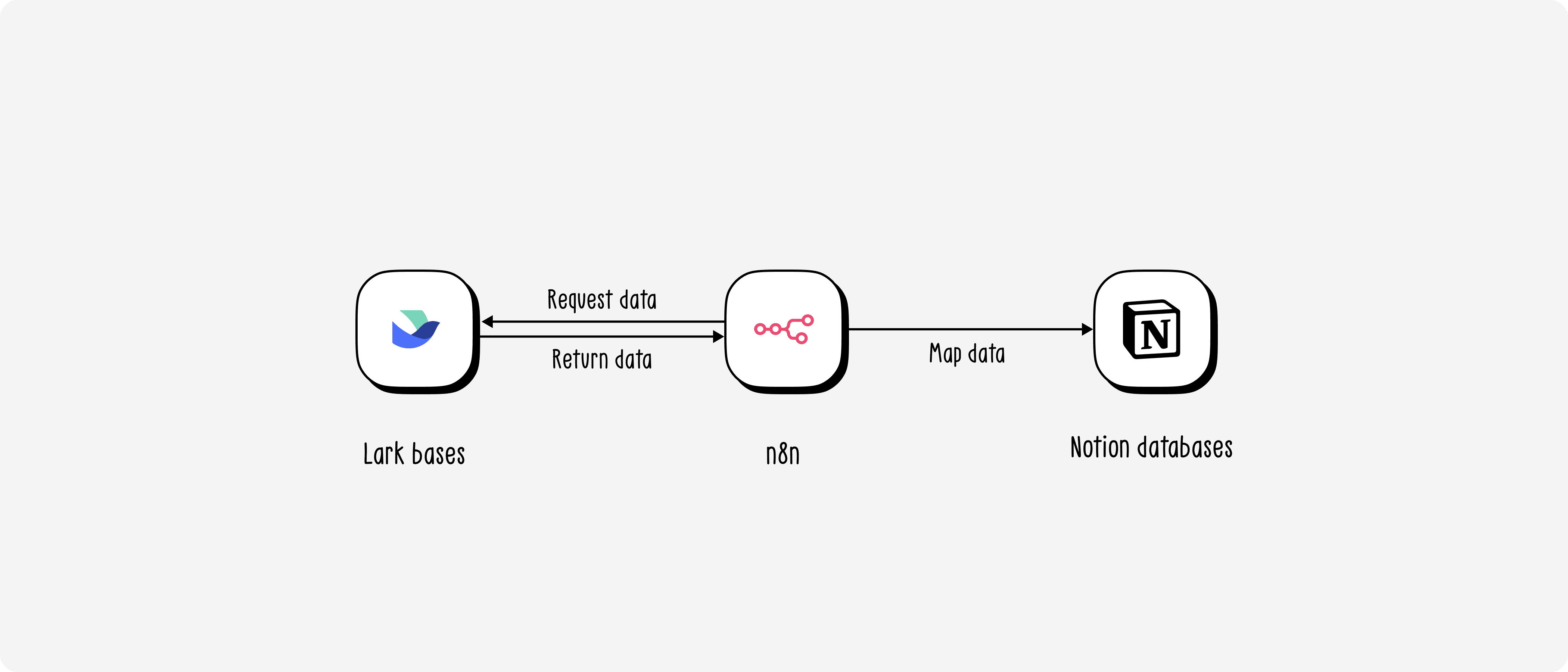
I migrated course by course, and within each course broke it into batches of 10 classes at a time — a deliberate decision to manage risk. With some courses having over 40 classes, migrating everything at once would make errors hard to trace and harder to roll back.
Mapping from Lark to Notion wasn't a straight-forward data migration — it was genuinely a data archaeology exercise. Some of the issues I ran into:
Fragmented data: The same class existed under two different tags in Lark due to past input errors. Before each migration batch, I had to audit and consolidate everything under a single canonical tag.
No unified conventions: Many fields in Lark had no clear convention. For
certificate_type, I had to define a new rule: if a student was marked as graduated with no additional notes, default to standard certificate.Unreliable graduation data: Some past teaching assistants had forgotten to mark
graduatedfor students who had actually completed the course. I had to do another workflow to verify by checking Google Drive for the existence of their homework files and final project — since those were the actual graduation requirements.Phone-based deduplication: Since the registration form didn't require a real name, the same student could appear under different nicknames across different courses. I used phone number as the unique identifier for deduplication — it's the least volatile field and the most reliable in this dataset.
What was working after the migration
Once the database was live on Notion, I started building automation workflows in n8n. Based on the checklist below, the workflows delivered included:
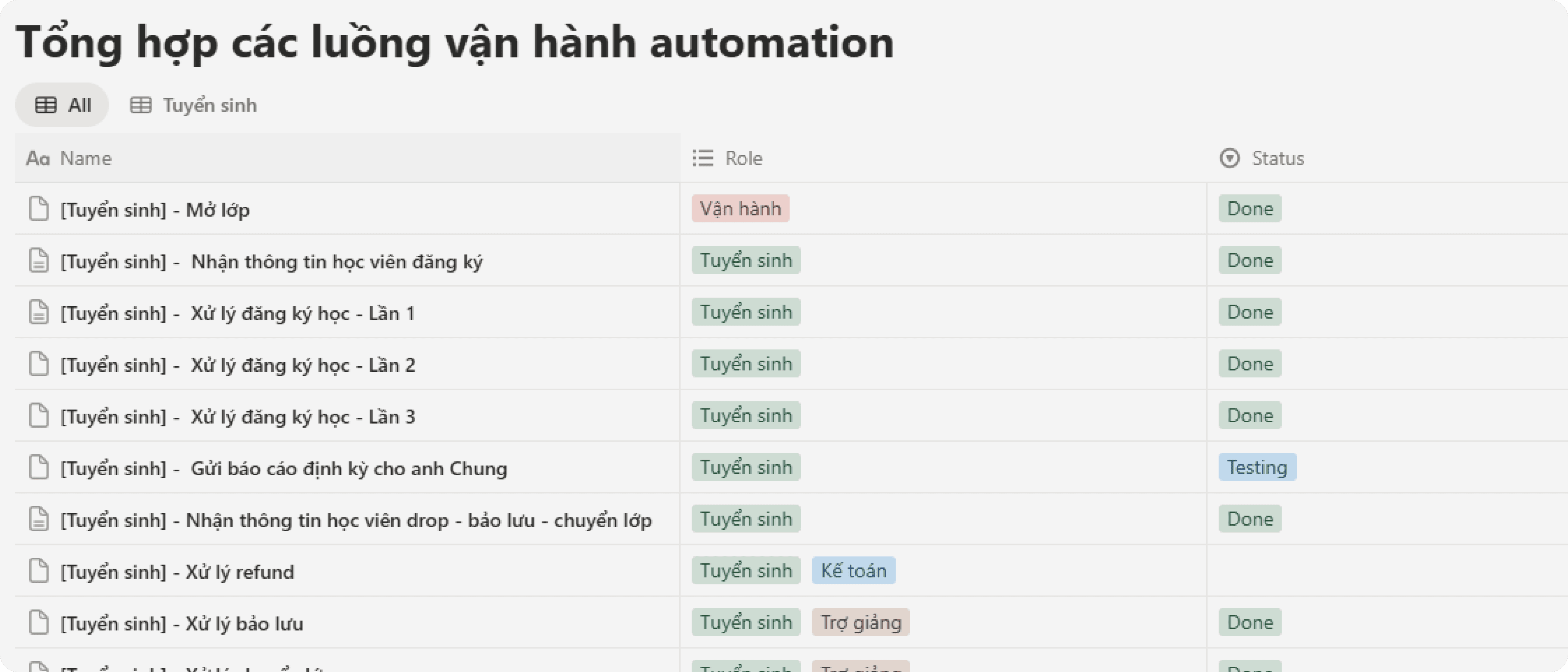
The Enrollment group covered the full lifecycle of a registration: from opening a class, receiving student info, processing registrations across multiple rounds, sending periodic reports, to handling drops, refunds, deferrals, and class transfers.
The Onboarding group ensured students were properly received: reminders 21 days out, reminders 3 days out, creating working files for teaching assistants, tuition reminders, and sending onboarding emails.
The Operations group began taking shape: creating Google Calendar events, tracking attendance, storing record files, sharing lecture slides, and sending homework reminders.
This was the first time UX Foundation had a system where every operational workflows could be automated — because now there was a database structured enough to query.
Result after migrating to Notion — and new problems
Notion ran stably for about six months. Long enough to confirm the direction was right — but also long enough for new problems to start surfacing.
Problem 1: Slow queries are an architectural limit, not a fixable bug
Notion was never designed as a pure relational database — I knew this from the start and accepted it at the MVP stage. But as data volume grew, that limit became increasingly apparent.
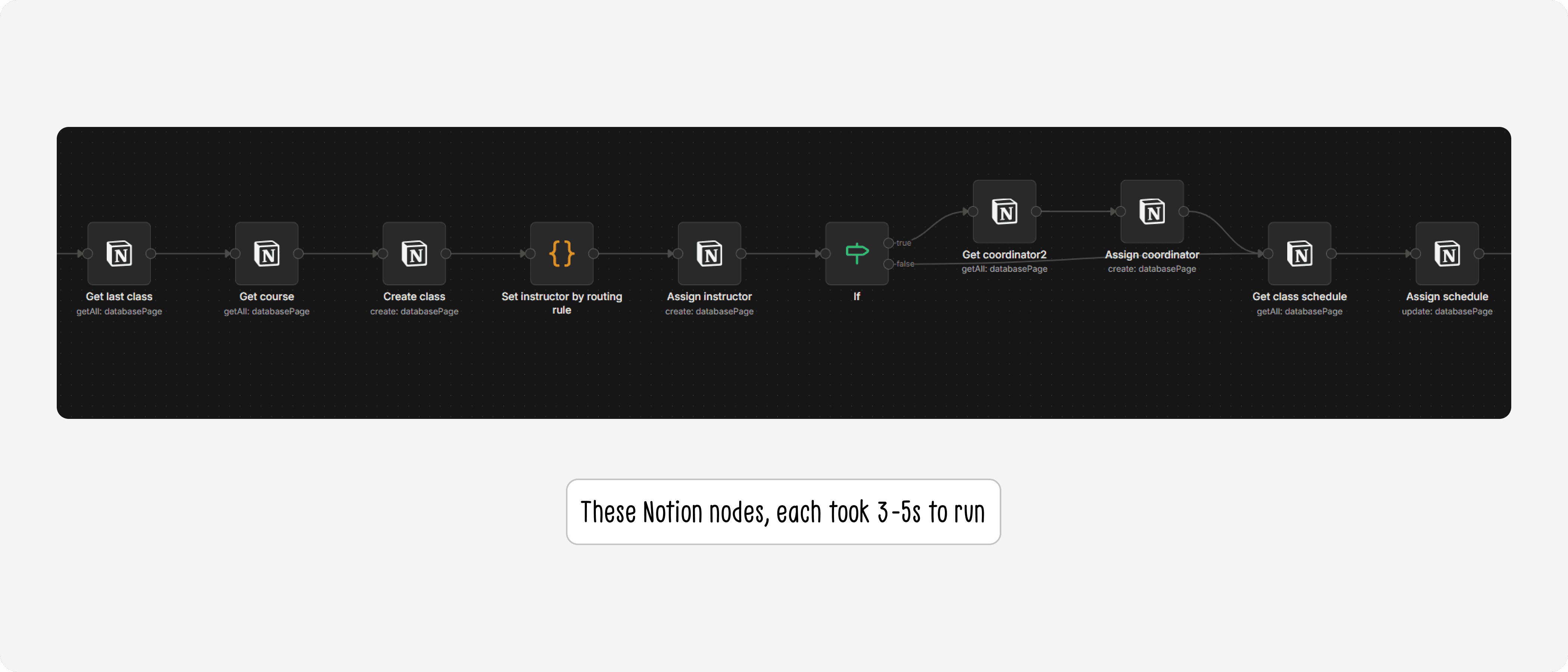
Each Notion node on n8n took an average of 3–5 seconds to process. For tables with heavy relations like classes or enrollments, a single automation workflow could need to chain through 4–5 nodes — meaning each run could take 15–25 seconds just to gather input data. This significantly extended testing time for the Ops team, and made it impossible for me to query quickly in response to ad-hoc questions from the team in real time.
Problem 2: Notion's security model wasn't fit for a production database
The database lived inside the Founder's personal Notion account, inside the organization's shared workspace. That workspace had edit access granted to all staffs — and sometimes external volunteers as well.
Even though the database page wasn't directly shared, the barrier to accessing the data was far too low. Anyone in the workspace, whether accidentally or intentionally, could find and modify student data. This is personal data — names, phone numbers, emails, financial information. Fortunately nothing had gone wrong, but "hasn't happened yet" is not a security strategy.
These two problems together made one thing clear: Notion had done its job well in the early stage, but the system needed to be built on a foundation that matched the current scale and requirements.
Phase 2 - Notion to NocoDB
I decided to migrate — and the sooner the better, because the more data accumulated, the harder migration would become.
Choosing the new stack
Layer | Tool | Why |
|---|---|---|
Database | PostgreSQL on the organization's VPS | Best practice for current scale with room to grow. Retains the relational model already designed. Future-proofed for features like text-to-query |
UI layer | NocoDB | Open-source and free — a key factor when optimizing costs. Non-tech friendly, so the Ops team can work independently without needing to write code |
Infrastructure | Existing organizational VPS | Already hosting the organization's n8n instance and Automation Foundation classes — just needed to add one more service to the existing |
One important clarification: NocoDB is not a separate database — it's a UI layer that connects directly to PostgreSQL. Every CRUD operation through NocoDB writes straight to PostgreSQL. This lets the Ops team work entirely through NocoDB without ever touching the database directly.
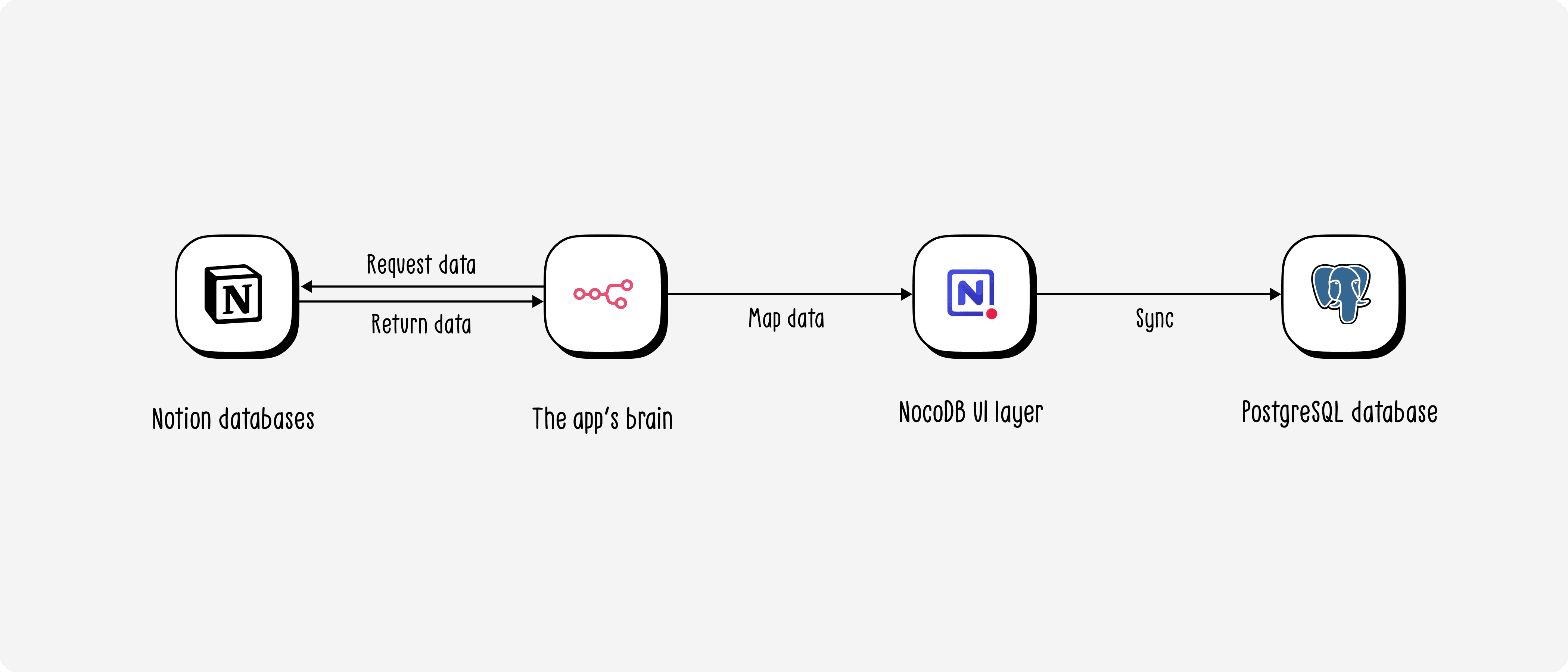
Deployment roadmap
Since the Ops team was running all workflows against Notion, a hard cutover wasn't a viable option. I designed a 5-phase roadmap to ensure data safety throughout the transition:
Phase 1 — Setup: Spin up PostgreSQL and NocoDB on the VPS, configure
docker-compose.ymlPhase 2 — Data migration: Use n8n to migrate each table from Notion into NocoDB (writing directly to PostgreSQL). Document the cutoff time per table to track and backfill any data created during migration
Phase 3 — Mirror: Run both in parallel — keep the existing Notion nodes, add NocoDB nodes alongside each workflow to write to both simultaneously. This gave the Ops team time to get familiar with NocoDB while Notion served as a safety net
Phase 4 — Remove Notion: Remove Notion nodes from all workflows, fully switching to PostgreSQL
Phase 5 — Delete data from Notion: Wipe all data from Notion to ensure security
Real challenges in this migration
Unlike the first migration, the difficulty this time didn't come from the data — it came from NocoDB and PostgreSQL being significantly stricter than Notion:
No ready-made n8n node: The NocoDB node in n8n was too basic for the complexity of a heavily relational database. I had to dig into NocoDB's API docs and switch to HTTP Request nodes instead.
Filter formulas instead of dropdowns: Notion lets you filter with a visual dropdown UI. NocoDB requires writing filter formulas in its own syntax — and since n8n only supports API v2 while NocoDB had moved to v3, I had to figure out how to write v3 formulas inside a v2 environment (prepending
@to the formula).Relations require two separate steps: In Notion, you can create a record with a relation in a single node. In NocoDB, you have to create the record first, then make a separate HTTP Request call to add the relation — and the direction is reversed: in NocoDB, relations are created from the "one" side, not the "many" side as in Notion.
All of these were documented as technical notes so the Ops team wouldn't have to rediscover them from scratch.
Final results
The most tangible result came from speed.
Previously, each Notion node on n8n took 3–5 seconds — and a workflow needing 4–5 chained queries could take over 20 seconds just to fetch data. After switching to PostgreSQL, those same 4–5 queries run in under 1 second. Not a marginal improvement — an order-of-magnitude difference.
The Ops Manager put it simply:
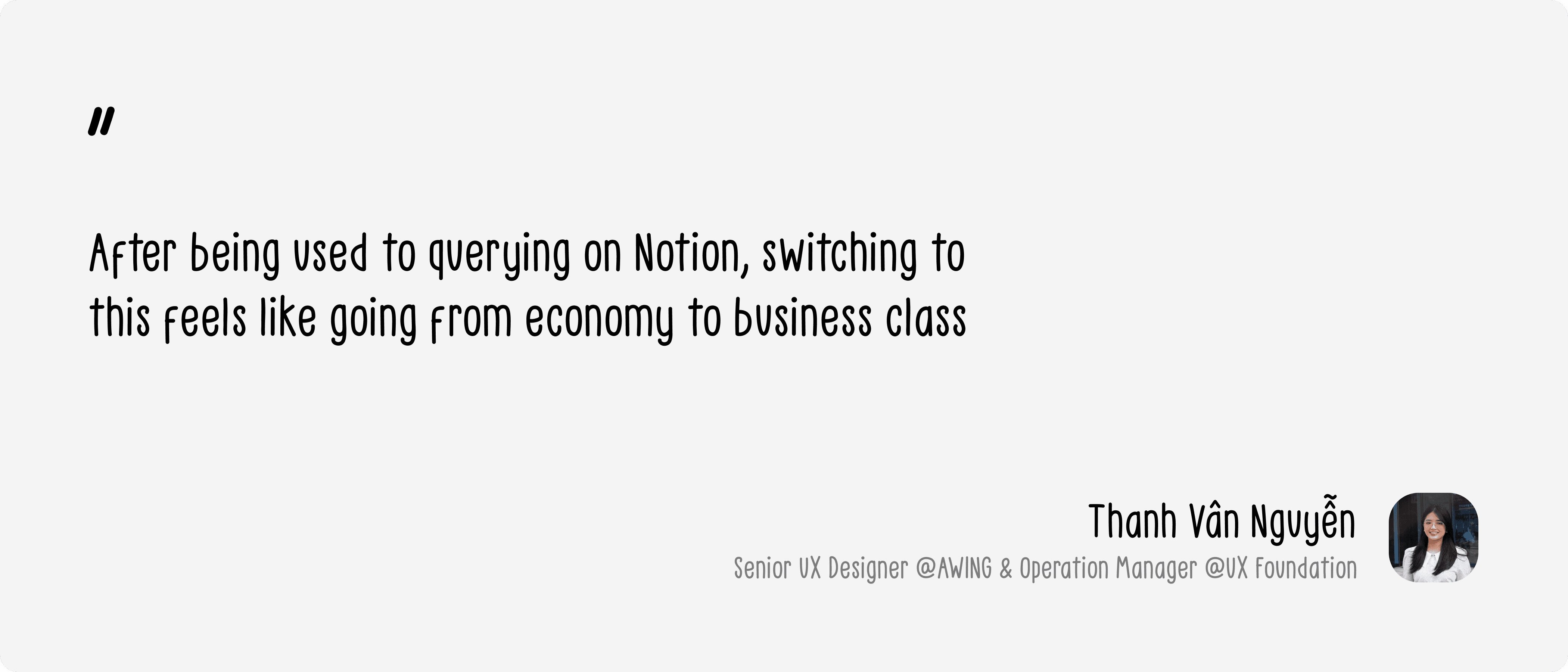
On the adoption side, the team had virtually no resistance. NocoDB loads fast, and its structure is cleaner — unlike Notion, where all databases lived in a single page that you had to scroll down through and wait to load one by one. Security also improved meaningfully: the database now lives on the organization's own VPS, with proper access controls, completely separated from the shared Notion workspace.
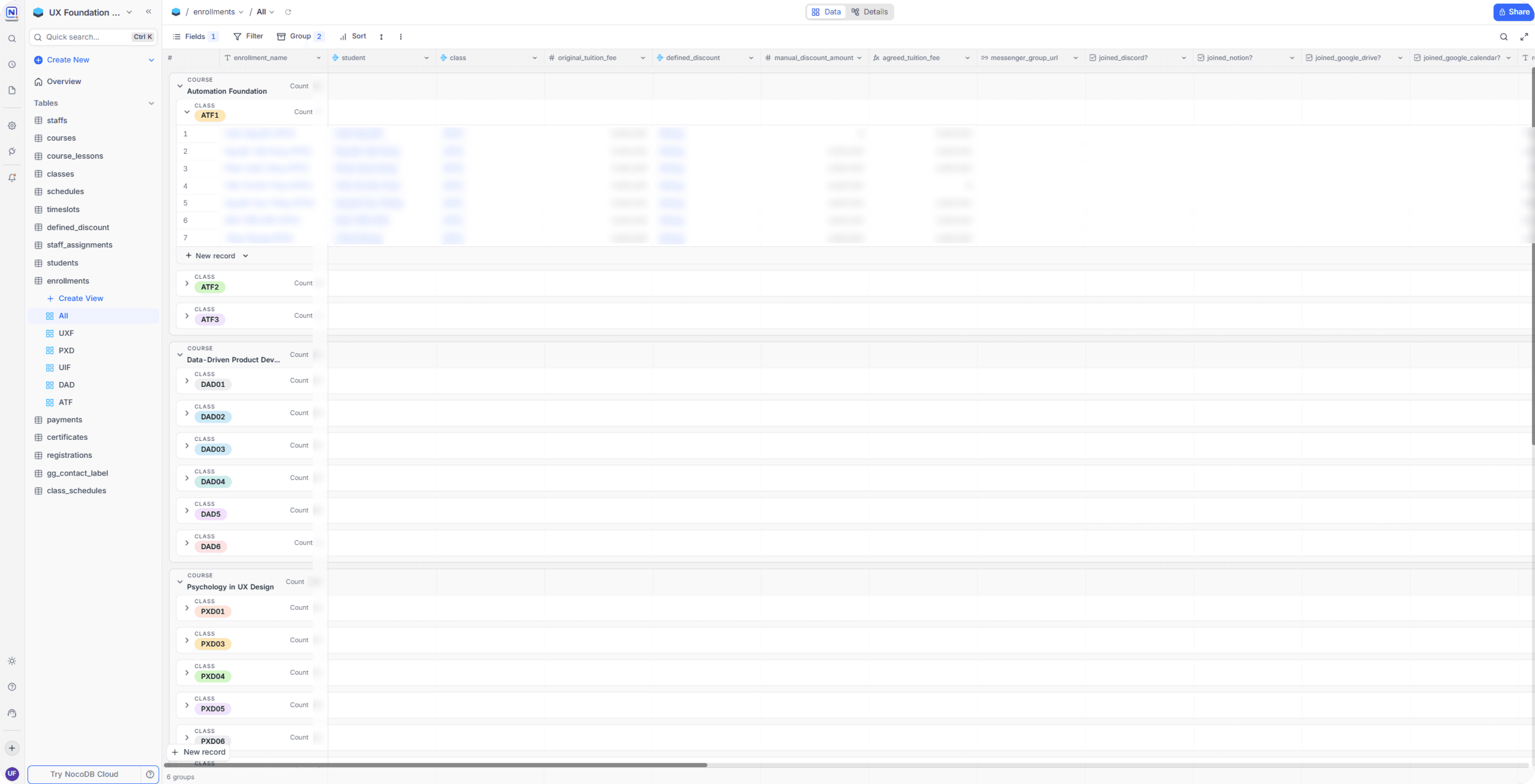
The system is currently at Phase 3–4: data is being written to both Notion and PostgreSQL in parallel as a safety measure, while the team gradually removes Notion nodes from each workflow. The end state of the roadmap is that all student data will exist solely on the organization's own infrastructure — with no dependency on any third-party platform.
Reflections
Automation didn't just help me work faster — it expanded what I could even attempt as a PO/PD
More than a year ago, I understood databases conceptually but had never actually sat down to design and run one in production. Not because I didn't want to — but because I had an unexamined assumption that it wasn't a PO/PD's job. Reality showed me otherwise: with the right knowledge combined with automation fluency, I designed the database, ran both migrations, and managed a production system on our own VPS — things I thought would require an engineering team to touch.
Good data surfaces questions that nobody could have asked before
One of the things I didn't expect was that the impact extended well beyond "faster queries." Once there was a properly structured database, we could start measuring things we never had numbers for: student location data to host community events in the right cities, experience-level distribution to adapt our teaching methodology, and more. These are insights the data always contained — but they only become accessible when the database is designed thoughtfully from the start.
If I had to do it again, I'd take the same path
In hindsight, I could have gone straight to PostgreSQL and NocoDB from day one — and saved a significant amount of migration time. But if I had to choose again, I'd still go through Notion first. Not because it was the optimal decision — but because it was the right decision given what I knew at the time. Knowing when a solution has reached its limit and it's time to move on — that's also a skill worth learning, and one no classroom can fully teach you.
Closing thoughts
I believe the future of work will be defined less by job titles and more by the actual value a person can create — regardless of how they create it. A Product Owner who understands automation doesn't just write better PRDs — they can build what they want to test, validate their own assumptions, and solve problems that would otherwise sit in a backlog waiting for an engineer.
This project is my proof of that. No engineering team, no dedicated budget, no hard deadline — just a real operational problem, a skill set nobody expected a PO to have, and a commitment to learning while doing.
What I want to give students in the Automation Foundation course isn't just the ability to use n8n — it's the perspective that your scope is much wider than your title, if you're willing to learn your way out of its boundaries.
Context
About a year ago, UX Foundation was running all of its internal data on Lark Suite. On the surface, things seemed fine — classes were running, student records were being saved. But as the workload of the teaching assistants and admin team grew, we started realizing that a huge amount of works was being done manually — works that could easily be automated. That's when we started building our first automation workflows — and that's when the real problems began to surface.
Problem statement
Just a few workflows in, we kept hitting a wall around "feasibility." Looking back, there were three root causes:
Data was designed to store, not to query
All information — student profiles, payment status, learning progress, course and class details — was stuffed into a single flat table per course. Every new registration added a new row. The result was a dataset full of duplicates — especially for students who had taken more than one course — with no way to cross-reference between courses.
A lot of important things had nowhere to live
Class schedules, staff assignments, operational class status — none of these belonged to any specific student, so we had no idea where to store them. This became the biggest bottleneck every time we tried to plan a new automation workflow.
Lark Suite didn't play well with our automation ecosystem
Lark Suite's API at the time was complex and error-prone. More importantly, the platform had poor support on n8n — our automation tool of choice — making it far harder than necessary to build and maintain automated workflows.
Product thinking
Jobs-To-Be-Done
Before redesigning anything, I sat down and listed out the actual jobs the team needed to get done — not "features", but the real operational needs behind each pain point.
"When I need to check which courses a student is enrolled in, I want to find it in seconds — instead of opening separate bases one by one."
"When a student registers for a new course, I want the system to automatically link them to their existing profile — instead of creating a brand new record and duplicating their data."
"When I need to assign a teaching assistant to a class, I want one single place to store that and have automation workflows read from it — instead of saving it somewhere nobody can find."
"When building a new automation workflow, I want the input data to always be consistent and well-structured — instead of having to 'clean up' data before every run."
These four needs pointed to one shared conclusion: the problem wasn't the tool — it was how the data was organized. No good database design, no good automation.
Database design
My belief was that there are countless ways to design a textbook-correct database, but that doesn't mean it'll actually fit the organization. To design something that works, I needed to understand how data had been, was currently being, and would be used — so I could tailor a solution that truly fit. Therefore, I ran a series of working sessions with the Founder and Ops Manager to uncover real use cases and constructed the ERD as followed:
Below are the four most important design decisions in this ERD — and the reasoning behind each.
Decision 1: Separating students and enrollments — one learner, many learning journeys
In the old Lark Suite setup, every time a student registered for a new course, the team created a completely new row — even if that person had already taken a previous course. The result was the same person appearing in 3 or 4 different places, sometimes with conflicting information.
Decision: students stores the person — existing exactly once. enrollments stores the relationship between that student and a specific class — including all payment, onboarding, and learning status. One student takes 3 courses → 1 record in students, 3 records in enrollments.
This directly resolved the biggest pain point: now a single query by student_id returns the full learning history of any person — no need to dig through separate tables.
Decision 2: The payment chain enrollments → payments → drops → refunds
During a working session with the Ops Manager, one seemingly simple question opened up a bigger question: "If a student drops out, how do we calculate the refund?" The answer was: it depends — on the reason, the timing, and sometimes the student doesn't fully drop but transfers to another class.
Instead of cramming everything into a status field inside enrollments, we designed a separate chain:
payments— stores each individual payment (one enrollment can have multiple payment installments)drops— records the dropout event, along with the applicable refund policy and amount owed. Thenew_enrollment_idfield captures cases where a student drops to transfer to a different classrefunds— stores proof of actual refund (date, transfer screenshot)
Without this, it would be impossible to automate workflows like "remind students of unfinished tuition payment" or "confirm refund completed" — because the data simply had no structure to query.
Decision 3: classes as an integration hub — single source of truth for the entire ops stack
A key insight from the team session: every time a new class was opened, the Ops Manager had to visit 7–8 different tools (Discord, Notion, Google Drive, Google Meet, Figma, Teamup, registration forms...) and copy-paste links between them. There was no single place storing all those links together.
Decision: the classes table doesn't just store class metadata — it stores all the URLs and tool IDs associated with it: discord_official_channel_id, notion_board_url, google_drive_url, figma_space_url, registration_form_url... This turns classes into a central hub that any automation can query to get the right tool link for the right class — no hardcoding, no memorizing.
Decision 4: A reusable scheduling system — schedules → timeslots → class_schedules
Each term, UX Foundation opens multiple classes with recurring time slots (e.g., "Tuesday and Friday evenings, 7–10 PM"). Previously, every class had to re-enter its schedule from scratch.
schedules stores reusable schedule templates. timeslots defines the specific time slots within each template. class_schedules is where a template gets "materialized" into actual sessions — mapping which lesson, which class, the Google Meet link, and the Google Calendar event ID for that session. instructor_schedules determines who teaches which session.
The result: opening a new class with the same schedule → just assign the existing template, and automation can generate Google Calendar events without any manual re-entry.
Phase 1 - Lark to Notion
Why Notion?
This wasn't a default choice — I had specific reasons for each priority.
First, Notion was already the team's primary workspace. That meant the learning curve was essentially zero — no onboarding anyone into a new tool, no friction during the transition.
Second, and more important at the time: Notion's database is remarkably forgiving. With traditional database systems, entering an enum value that hasn't been predefined throws an error immediately. Notion doesn't — it just creates a new option on the fly. This flexibility became a strategic advantage: in the early phase of data standardization, when the schema still had plenty of unhandled edge cases, Notion's permissiveness let us reduce complexity and ship automation workflows earlier instead of getting blocked by data validation errors.
The migration process
I migrated course by course, and within each course broke it into batches of 10 classes at a time — a deliberate decision to manage risk. With some courses having over 40 classes, migrating everything at once would make errors hard to trace and harder to roll back.
Mapping from Lark to Notion wasn't a straight-forward data migration — it was genuinely a data archaeology exercise. Some of the issues I ran into:
Fragmented data: The same class existed under two different tags in Lark due to past input errors. Before each migration batch, I had to audit and consolidate everything under a single canonical tag.
No unified conventions: Many fields in Lark had no clear convention. For
certificate_type, I had to define a new rule: if a student was marked as graduated with no additional notes, default to standard certificate.Unreliable graduation data: Some past teaching assistants had forgotten to mark
graduatedfor students who had actually completed the course. I had to do another workflow to verify by checking Google Drive for the existence of their homework files and final project — since those were the actual graduation requirements.Phone-based deduplication: Since the registration form didn't require a real name, the same student could appear under different nicknames across different courses. I used phone number as the unique identifier for deduplication — it's the least volatile field and the most reliable in this dataset.
What was working after the migration
Once the database was live on Notion, I started building automation workflows in n8n. Based on the checklist below, the workflows delivered included:
The Enrollment group covered the full lifecycle of a registration: from opening a class, receiving student info, processing registrations across multiple rounds, sending periodic reports, to handling drops, refunds, deferrals, and class transfers.
The Onboarding group ensured students were properly received: reminders 21 days out, reminders 3 days out, creating working files for teaching assistants, tuition reminders, and sending onboarding emails.
The Operations group began taking shape: creating Google Calendar events, tracking attendance, storing record files, sharing lecture slides, and sending homework reminders.
This was the first time UX Foundation had a system where every operational workflows could be automated — because now there was a database structured enough to query.
Result after migrating to Notion — and new problems
Notion ran stably for about six months. Long enough to confirm the direction was right — but also long enough for new problems to start surfacing.
Problem 1: Slow queries are an architectural limit, not a fixable bug
Notion was never designed as a pure relational database — I knew this from the start and accepted it at the MVP stage. But as data volume grew, that limit became increasingly apparent.
Each Notion node on n8n took an average of 3–5 seconds to process. For tables with heavy relations like classes or enrollments, a single automation workflow could need to chain through 4–5 nodes — meaning each run could take 15–25 seconds just to gather input data. This significantly extended testing time for the Ops team, and made it impossible for me to query quickly in response to ad-hoc questions from the team in real time.
Problem 2: Notion's security model wasn't fit for a production database
The database lived inside the Founder's personal Notion account, inside the organization's shared workspace. That workspace had edit access granted to all staffs — and sometimes external volunteers as well.
Even though the database page wasn't directly shared, the barrier to accessing the data was far too low. Anyone in the workspace, whether accidentally or intentionally, could find and modify student data. This is personal data — names, phone numbers, emails, financial information. Fortunately nothing had gone wrong, but "hasn't happened yet" is not a security strategy.
These two problems together made one thing clear: Notion had done its job well in the early stage, but the system needed to be built on a foundation that matched the current scale and requirements.
Phase 2 - Notion to NocoDB
I decided to migrate — and the sooner the better, because the more data accumulated, the harder migration would become.
Choosing the new stack
Layer | Tool | Why |
|---|---|---|
Database | PostgreSQL on the organization's VPS | Best practice for current scale with room to grow. Retains the relational model already designed. Future-proofed for features like text-to-query |
UI layer | NocoDB | Open-source and free — a key factor when optimizing costs. Non-tech friendly, so the Ops team can work independently without needing to write code |
Infrastructure | Existing organizational VPS | Already hosting the organization's n8n instance and Automation Foundation classes — just needed to add one more service to the existing |
One important clarification: NocoDB is not a separate database — it's a UI layer that connects directly to PostgreSQL. Every CRUD operation through NocoDB writes straight to PostgreSQL. This lets the Ops team work entirely through NocoDB without ever touching the database directly.
Deployment roadmap
Since the Ops team was running all workflows against Notion, a hard cutover wasn't a viable option. I designed a 5-phase roadmap to ensure data safety throughout the transition:
Phase 1 — Setup: Spin up PostgreSQL and NocoDB on the VPS, configure
docker-compose.ymlPhase 2 — Data migration: Use n8n to migrate each table from Notion into NocoDB (writing directly to PostgreSQL). Document the cutoff time per table to track and backfill any data created during migration
Phase 3 — Mirror: Run both in parallel — keep the existing Notion nodes, add NocoDB nodes alongside each workflow to write to both simultaneously. This gave the Ops team time to get familiar with NocoDB while Notion served as a safety net
Phase 4 — Remove Notion: Remove Notion nodes from all workflows, fully switching to PostgreSQL
Phase 5 — Delete data from Notion: Wipe all data from Notion to ensure security
Real challenges in this migration
Unlike the first migration, the difficulty this time didn't come from the data — it came from NocoDB and PostgreSQL being significantly stricter than Notion:
No ready-made n8n node: The NocoDB node in n8n was too basic for the complexity of a heavily relational database. I had to dig into NocoDB's API docs and switch to HTTP Request nodes instead.
Filter formulas instead of dropdowns: Notion lets you filter with a visual dropdown UI. NocoDB requires writing filter formulas in its own syntax — and since n8n only supports API v2 while NocoDB had moved to v3, I had to figure out how to write v3 formulas inside a v2 environment (prepending
@to the formula).Relations require two separate steps: In Notion, you can create a record with a relation in a single node. In NocoDB, you have to create the record first, then make a separate HTTP Request call to add the relation — and the direction is reversed: in NocoDB, relations are created from the "one" side, not the "many" side as in Notion.
All of these were documented as technical notes so the Ops team wouldn't have to rediscover them from scratch.
Final results
The most tangible result came from speed.
Previously, each Notion node on n8n took 3–5 seconds — and a workflow needing 4–5 chained queries could take over 20 seconds just to fetch data. After switching to PostgreSQL, those same 4–5 queries run in under 1 second. Not a marginal improvement — an order-of-magnitude difference.
The Ops Manager put it simply:
On the adoption side, the team had virtually no resistance. NocoDB loads fast, and its structure is cleaner — unlike Notion, where all databases lived in a single page that you had to scroll down through and wait to load one by one. Security also improved meaningfully: the database now lives on the organization's own VPS, with proper access controls, completely separated from the shared Notion workspace.
The system is currently at Phase 3–4: data is being written to both Notion and PostgreSQL in parallel as a safety measure, while the team gradually removes Notion nodes from each workflow. The end state of the roadmap is that all student data will exist solely on the organization's own infrastructure — with no dependency on any third-party platform.
Reflections
Automation didn't just help me work faster — it expanded what I could even attempt as a PO/PD
More than a year ago, I understood databases conceptually but had never actually sat down to design and run one in production. Not because I didn't want to — but because I had an unexamined assumption that it wasn't a PO/PD's job. Reality showed me otherwise: with the right knowledge combined with automation fluency, I designed the database, ran both migrations, and managed a production system on our own VPS — things I thought would require an engineering team to touch.
Good data surfaces questions that nobody could have asked before
One of the things I didn't expect was that the impact extended well beyond "faster queries." Once there was a properly structured database, we could start measuring things we never had numbers for: student location data to host community events in the right cities, experience-level distribution to adapt our teaching methodology, and more. These are insights the data always contained — but they only become accessible when the database is designed thoughtfully from the start.
If I had to do it again, I'd take the same path
In hindsight, I could have gone straight to PostgreSQL and NocoDB from day one — and saved a significant amount of migration time. But if I had to choose again, I'd still go through Notion first. Not because it was the optimal decision — but because it was the right decision given what I knew at the time. Knowing when a solution has reached its limit and it's time to move on — that's also a skill worth learning, and one no classroom can fully teach you.
Closing thoughts
I believe the future of work will be defined less by job titles and more by the actual value a person can create — regardless of how they create it. A Product Owner who understands automation doesn't just write better PRDs — they can build what they want to test, validate their own assumptions, and solve problems that would otherwise sit in a backlog waiting for an engineer.
This project is my proof of that. No engineering team, no dedicated budget, no hard deadline — just a real operational problem, a skill set nobody expected a PO to have, and a commitment to learning while doing.
What I want to give students in the Automation Foundation course isn't just the ability to use n8n — it's the perspective that your scope is much wider than your title, if you're willing to learn your way out of its boundaries.